How to Setup an Ask-to-Follow Gatekeeper on Instagram to 10x Follower Growth

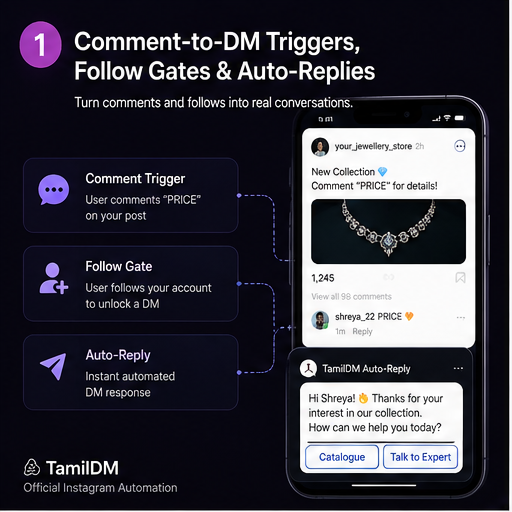
When your Instagram Reel goes viral, getting thousands of comments like "PRICE" or "LINK" is exciting. However, up to 80% of commenters are non-followers who get their link and leave without following your page.
With TamilDM's Ask-to-Follow Gatekeeper, you can automatically check whether a commenter follows your Instagram page before sending them your resource or checkout link. If they don't follow you yet, TamilDM gently prompts them to hit the Follow button first, doubling or tripling your follower conversion rate on every post.
Why Use an Ask-to-Follow Gatekeeper?
Traditional automation sends direct links to anyone who comments. While this provides a good user experience, it misses out on long-term channel growth.
Here is why top creators and brands use follow gating:
- Compounded Follower Growth: Convert casual viewers into permanent followers automatically.
- Meta API Safe: TamilDM uses official Meta Graph API Webhooks to verify follower relationship status in real-time.
- Higher Account Retention: Followers receive your future Reels on their feed, increasing long-term organic reach.
Step-by-Step Setup & Publishing Guide
Step 1: Create a New Automation Campaign
Log into your TamilDM Dashboard and click on Automations → Create New. Select Comment-to-DM Trigger.
Step 2: Set Your Trigger Keywords
Specify the trigger words that will activate the automation in your Reel caption (e.g., GUIDE, PRESET, COURSE, PRICE).
Step 3: Enable the "Ask-to-Follow" Toggle
In the flow builder, toggle ON the Follower Gatekeeper setting. TamilDM will split the response logic into two paths:
- Existing Followers: Receive the instant DM with your download link immediately.
- Non-Followers: Receive a friendly message: "Thanks for your interest! Follow @yourhandle and click below to unlock your exclusive link ✨" with a direct Check Follow Status button.
Step 4: Add Public Comment Reply Randomization
Add 3-5 randomized public comment replies (e.g., "Check your DMs! 📩", "Sent to your inbox! ✨"). This keeps your comment section active and natural.
Step 5: Test & Publish
Click Publish Campaign. Create your Reel with a clear Call-to-Action: "Comment 'GUIDE' below — non-followers must follow us to receive the direct download link!"
Best Practices for Maximum Conversions
- Offer Real Value: Ensure the lead magnet or discount you offer is worth the 1-second effort of hitting follow.
- Keep Tone Friendly: Frame the follow gate as a community perk rather than a paywall.
- Monitor Analytics: Use TamilDM's Ask Brain Analyst to track your follower conversion rate week-over-week.
Frequently asked questions
501Is a follow gate allowed under Instagram's rules?
02Does the follow gate annoy people and cost me conversions?
03How does the tool know whether someone follows me?
04What happens if someone follows and then unfollows after getting the link?
05Should I use a follow gate on every automation?
Ready to Safe-Automate Your Instagram?
Connect TamilDM using Meta's official API to handle auto replies, stories, and DM flows securely. Start free in under 5 minutes.
Recommended Guides & Tutorials
 Guides
How to Automatically DM Someone Who Comments on Instagram (Step-by-Step)
Learn how to set up automated comment-to-DM triggers on Instagram Reels and posts safely using Meta's official Graph API.

TamilDM Team
Product & Growth
 Guides
How to Sell on Instagram Without a Website in India (2026 Guide)
A complete walkthrough for Indian sellers taking orders inside Instagram DMs — UPI and Razorpay payment links, COD handling, order confirmation, and the rules Meta actually enforces.
Sri Guru
Founder
GuidesHow to Sell Digital Products & Collect UPI Payments Directly in Instagram DMs
Learn how to connect Razorpay & UPI payment links to your Instagram DM automations to sell eBooks, courses, and digital products on autopilot.
TamilDM Team
Product & Growth