How to Sell Digital Products & Collect UPI Payments Directly in Instagram DMs

Selling digital products like eBooks, Lightroom presets, Notion templates, or online masterclasses usually requires directing users to a third-party website or bio link. Every extra click reduces your conversion rate by 30% to 50%.
With TamilDM's Digital Storefront & UPI Integration, Instagram creators and D2C brands can sell products and collect instant Razorpay / GPay / PhonePe / Paytm UPI payments directly inside the Instagram DM conversation.
The Power of 1-Click DM Selling
When a user comments on your post, they are at peak purchase intent. Delivering a native payment button inside DMs offers huge benefits:
- Zero Drop-off: Customers pay via 1-click UPI without leaving Instagram.
- Instant Product Delivery: As soon as payment is confirmed via webhook, TamilDM automatically delivers the PDF, course link, or digital file in the DM.
- No Expensive Website Required: You don't need a custom Shopify or WordPress site to start selling.
Step-by-Step Configuration & Publishing Guide
Step 1: Connect Payment Gateway
Navigate to TamilDM Dashboard → Settings → Payment Integrations. Connect your Razorpay or UPI VPA API keys.
Step 2: Add Your Product to Digital Storefront
Click Storefront → Add Product. Enter your product title, description, price in INR (e.g., ₹299), and upload the digital file or access URL.
Step 3: Configure Comment-to-DM Trigger
Create a new automation rule with trigger keywords like BUY, EBOOK, COURSE, or ORDER.
Step 4: Add Automated DM Flow with Payment Button
Set up your DM response message:
- Title: "Here is your link for the Instagram Growth Blueprint eBook 📘"
- Button Action: 1-Click UPI Payment (Razorpay)
- Auto-Delivery Rule: Attach the download file to send automatically upon successful payment verification.
Step 5: Test & Publish
Run a live test transaction to confirm the instant delivery webhook works cleanly. Once verified, post your Reel with the call-to-action: "Comment 'BUY' below to get instant DM checkout!"
Summary Checklist
- Razorpay / UPI Connected: Verified via TamilDM webhook settings.
- Instant Delivery Active: File attached to post-payment confirmation message.
- Analytics Tracked: View real-time revenue and conversion metrics in TamilDM Admin.
Frequently asked questions
501Do buyers have to leave Instagram to pay?
02How does the buyer receive the product after paying?
03Can I sell physical products this way too?
04What is the smallest amount worth selling this way?
05Do I need GST registration to sell digital products on Instagram?
Ready to Safe-Automate Your Instagram?
Connect TamilDM using Meta's official API to handle auto replies, stories, and DM flows securely. Start free in under 5 minutes.
Recommended Guides & Tutorials
GuidesHow to Sell on Instagram Without a Website in India (2026 Guide)
A complete walkthrough for Indian sellers taking orders inside Instagram DMs — UPI and Razorpay payment links, COD handling, order confirmation, and the rules Meta actually enforces.

Sri Guru
Founder
 Guides
How to Setup an Ask-to-Follow Gatekeeper on Instagram to 10x Follower Growth
Learn how to turn viral Reel comments into loyal followers using TamilDM's official Meta Graph API Ask-to-Follow gatekeeper before delivering private DM links.
Sri Guru
Founder
 Guides
How to Automatically DM Someone Who Comments on Instagram (Step-by-Step)
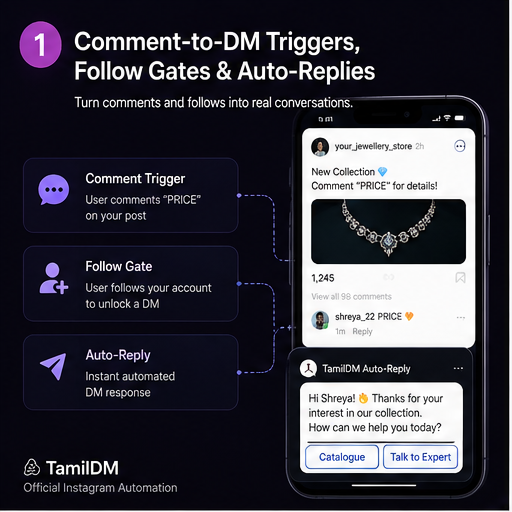
Learn how to set up automated comment-to-DM triggers on Instagram Reels and posts safely using Meta's official Graph API.
TamilDM Team
Product & Growth