Instagram Comment Automation: The Ultimate Guide
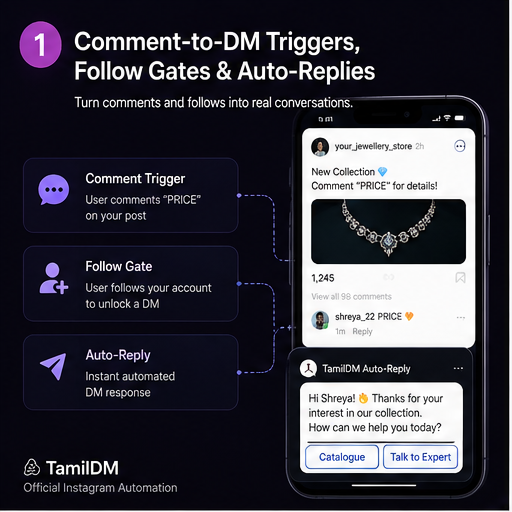
If you have ever scrolled through Instagram and seen a creator post: "Comment INFO and I will DM you the link," you have witnessed Comment Automation in action.
Historically, creators had to manually copy-paste links in direct messages to hundreds of commenters. This was time-consuming, prone to rate limits, and led to missed leads. Today, automated triggers let you handle comments instantly, boosting engagement rates by up to 400%.
In this guide, we will cover how comment automation works, how to configure keyword triggers, and how to use follow gates to turn comment waves into active email list signups.
How Comment Automation Works
Comment automation is divided into two parts:
- The Keyword Trigger: You publish a Reel or Post instructing users to write a specific trigger phrase (e.g., "AUTOMATE", "GUIDE", "INFO").
- The Public & Private Reply: The second someone comments the keyword, the automation tool:
- Publicly replies to their comment (e.g., "Just sent it over! Check your DMs 📥").
- Privately sends them a DM containing the link, product description, or button menu.
This double response loop tells Instagram's algorithm that your post is highly active, increasing your likelihood of landing on the Explore feed.
Setting Up Triggers Effectively
To maximize conversions, you must make it easy for your followers to trigger the automation.
Use Short, Simple Keywords
Avoid long phrases or emojis. Simple, singular words like INFO, GROW, TIPS, or LINK are easy to type and hard to autocomplete incorrectly.
Use Case-Insensitive Matching
Official automation platforms ignore casing. Whether a user comments info, Info, or INFO, they will receive the reply.
Always state the trigger keyword clearly in your caption, and overlay it as text on the first 3 seconds of your Reel. This visual anchor drives up to 50% more comments.
What is a Follow Gate?
A Follow Gate is a compliance-safe feature that filters automation replies based on whether the commenter is already following your page.
Here is how the flow works:
[User Comments Keyword]
          │
          ▼
[System Checks Follower Status]
     ├── Yes ──► Sends Private DM with link instantly
     └── No  ──► Sends: "Hey! Follow my page first, then comment again to get the link!"
By adding a follow gate, you convert viral attention into direct, long-term follower growth.
Best Practices for Safety
While official automation is safe, you must avoid spammy configurations:
- Vary Public Replies: Do not use the exact same text reply for every comment. Configure 3-5 variations (e.g., "Sent!", "Check your inbox!", "Details sent 📥") so Instagram doesn't flag your comments as repetitive.
- Keep Links in DMs: Never put links directly in public comment replies. Instagram's link spam filters will flag your account. Always route links through direct messages.
- Respect Rate Limits: Official systems automatically queue responses during heavy viral traffic to comply with Meta's hourly API limits.
In our next guide, we will explore how to configure structured menus, carousels, and quick replies within the private DM space.
Frequently asked questions
501What is the difference between a public comment reply and a comment-to-DM?
02How many keywords should one automation watch?
03Can comment automation run on old posts?
04Does automating comment replies boost reach?
05What happens when two keywords match the same comment?
Ready to Safe-Automate Your Instagram?
Connect TamilDM using Meta's official API to handle auto replies, stories, and DM flows securely. Start free in under 5 minutes.
Recommended Guides & Tutorials
 Guides
Instagram DM Automation: Complete Setup Guide
Learn how to configure automated welcome messages, private keyword triggers, and story mention replies safely on Instagram.

Sri Guru
Founder
GuidesHow to Automatically DM Someone Who Comments on Instagram (Step-by-Step)
Learn how to set up automated comment-to-DM triggers on Instagram Reels and posts safely using Meta's official Graph API.
TamilDM Team
Product & Growth
 Guides
How to Sell on Instagram Without a Website in India (2026 Guide)
A complete walkthrough for Indian sellers taking orders inside Instagram DMs — UPI and Razorpay payment links, COD handling, order confirmation, and the rules Meta actually enforces.
Sri Guru
Founder