Instagram DM Automation: Complete Setup Guide
Direct messages are the primary conversion channel on social media. It is where questions are asked, pricing is discussed, and transactions are closed. However, manually responding to DMs at 2 AM is impossible for scaling creators and businesses.
Instagram DM Automation solves this. By using official Graph APIs, you can establish an automated inbox that answers FAQs, routes leads, collects emails, and delivers assets instantly.
In this step-by-step setup guide, we will walk you through how to configure welcome triggers, story mention replies, and private keyword flows.
1. The Welcome Message (Conversation Starters)
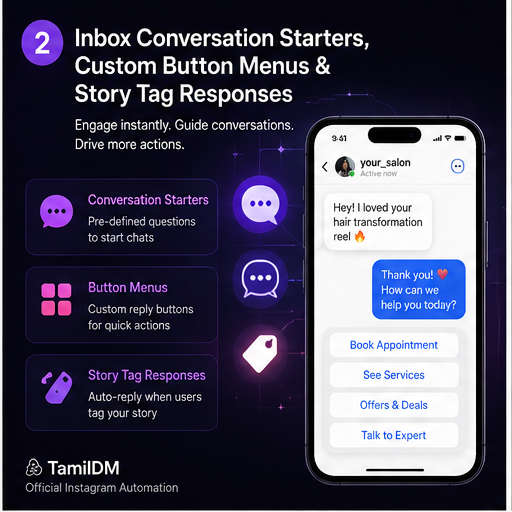
When a user opens your Instagram inbox for the first time, Meta allows you to display up to 4 custom buttons called Conversation Starters.
These buttons act as instant FAQ triggers. Examples include:
- "How much does it cost?"
- "Book an appointment"
- "Join the creator community"
- "Speak to a human"
When the user clicks a button, the automation instantly delivers the answer or starts a lead collection flow. This reduces friction, as users do not have to type out their questions.
2. Story Mention Automation
Story Mention Automation is one of the most powerful tools for building user-generated content (UGC). When a customer tags your account in their story:
- Webhook Notification: Instagram registers the mention and alerts our system.
- Auto Response: We send an instant DM saying: "Thank you so much for the tag! Here is a 10% coupon code for your next order: THANKYOU10 🎁"
This encourages followers to share your brand, driving viral word-of-mouth reach.
Story mentions only trigger automations if the story is posted by a public account. Private accounts can still mention you, but messaging restrictions may apply.
3. Direct Message Keywords
Similar to comments, you can set keywords inside the direct messaging interface. For example, if you sell coaching programs, you can ask users to DM you the word COACH.
When they send this word, instead of a simple link, you can trigger a structured conversation:
- Question 1: "What is your main marketing goal?" (User clicks: "Leads", "Followers", or "Sales")
- Question 2: "What is your current monthly budget?"
- Response: If budget is high, send booking calendar. If low, deliver a free guide.
This qualification engine filters out low-intent leads, saving you hours of manual messaging.
Best Practices for DM Conversions
To maintain a human feel while automating, keep these rules in mind:
- Use Quick Replies: Give users buttons to select instead of forcing them to type answers.
- Keep Messages Short: Break up text blocks. Send 1-2 sentences, followed by a button, rather than a massive wall of text.
- Offer Human Escalation: Always include a path to talk to a real person. If a user types "help" or clicks "Speak to support," pause the automation and notify your team.
In our next guides, we will explore industry-specific strategies for lead generation.
Frequently asked questions
501What is a welcome message and when does it fire?
02Can I automate replies to story mentions?
03How many automated messages can I send in a month?
04Should automation handle the whole conversation?
05What happens if someone replies to an automated DM?
Ready to Safe-Automate Your Instagram?
Connect TamilDM using Meta's official API to handle auto replies, stories, and DM flows securely. Start free in under 5 minutes.
Recommended Guides & Tutorials
 Guides
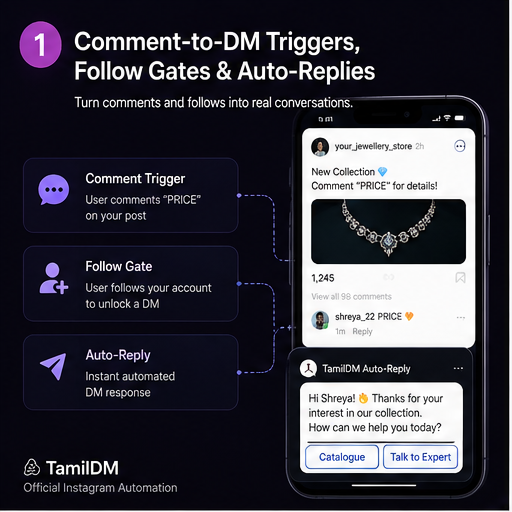
Instagram Comment Automation: The Ultimate Guide
Master comment-to-DM triggers, automatic replies, and follow gates using Meta's official messaging automation system.

TamilDM Team
Product & Growth
GuidesHow to Automatically DM Someone Who Comments on Instagram (Step-by-Step)
Learn how to set up automated comment-to-DM triggers on Instagram Reels and posts safely using Meta's official Graph API.
TamilDM Team
Product & Growth
 Guides
How to Sell on Instagram Without a Website in India (2026 Guide)
A complete walkthrough for Indian sellers taking orders inside Instagram DMs — UPI and Razorpay payment links, COD handling, order confirmation, and the rules Meta actually enforces.
Sri Guru
Founder