Why Unofficial Instagram Bots Get Accounts Restricted
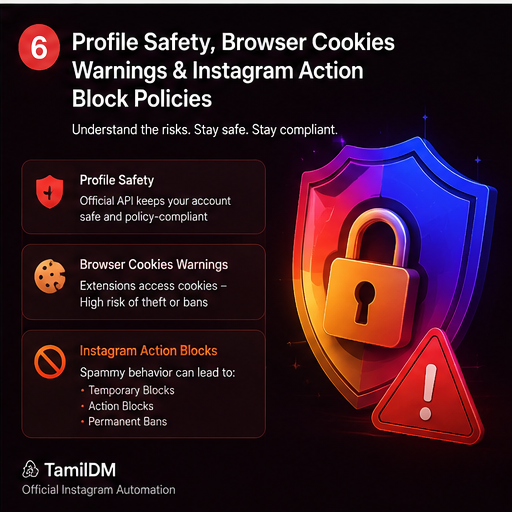
When it comes to scaling your brand or business on Instagram, automation is a superpower. It allows you to answer customer queries instantly, follow up on leads, and capture contact information on autopilot. However, there is a right way and a dangerous way to automate.
Every week, hundreds of creators and businesses wake up to find their accounts hit with Action Blocks, Shadowbans, or permanent Account Deactivations. Almost all of these penalties stem from the same root cause: using unofficial Instagram bots.
In this guide, we will break down the mechanics of how Meta detects unofficial tools and how you can automate safely without risking your account health.
What Counts as Unofficial Automation?
Before we look at the mechanics of detection, we must define what makes an automation tool "unofficial." Unofficial tools are any software packages or browser plugins that attempt to automate actions on Instagram without going through Meta's official Graph API.
These bots typically fall into three categories:
- Browser Extensions: Chrome plugins that run in the background, mimicking your clicks to send direct messages, write comments, or follow users.
- Headless Scrapers & Emulators: Server-side software that runs instances of virtual Android/iOS devices or headless web browsers (like Playwright or Puppeteer) logged into your account.
- Password-Share Services: Platforms that ask for your raw Instagram username and password to log in from their own servers to automate actions.
Sharing your raw password with any third-party software is a direct violation of Meta's Terms of Service and is the fastest path to having your account compromised or flagged.
How Meta Detects Unofficial Bots
Meta has invested millions of dollars into integrity systems that detect automated activity. They look at three primary categories of signals:
1. Device Fingerprinting and User-Agent Swapping
Official Instagram apps send specific metadata headers to Meta servers, including device model numbers, hardware identifiers, OS version details, and networking characteristics. When an emulator or headless script logs in, it must simulate this data. If the virtual device shifts from an iPhone fingerprint in Chennai to a server IP in Virginia within minutes, Meta's anomaly engines flag the login instantly.
2. Behavioral Patterns & Click Speeds
Humans do not behave in millisecond increments. If a user accounts page sends 100 direct messages at exactly 1.5-second intervals, or sweeps 50 posts to write "Great post! 🔥" every 10 seconds, it's flagged as robotic. Official APIs do not require fake clicks; actions are handled cleanly behind the scenes.
3. IP Reputation & Server Requests
Hosting providers like AWS, DigitalOcean, or Hetzner use specific IP subnets. If your automation bot logs in from an IP block that belongs to a data center rather than a residential internet service provider (ISP), it is flagged immediately as non-human traffic.
The Consequences of Violating Meta's Policies
If Meta's engines detect unofficial activity, they gradually escalate enforcement actions:
- Action Blocks: You are temporarily blocked from liking, commenting, or sending DMs for 24 hours to 7 days.
- Shadowbans: Your content is hidden from non-followers on search pages, hashtags, and the Explore feed, crushing your organic reach.
- Log Out Loops: Meta logs you out and requires phone/email verification or video selfies.
- Permanent Deactivation: Your page is deleted, and your username is blacklisted forever.
How Official Automation Tools Keep You Safe
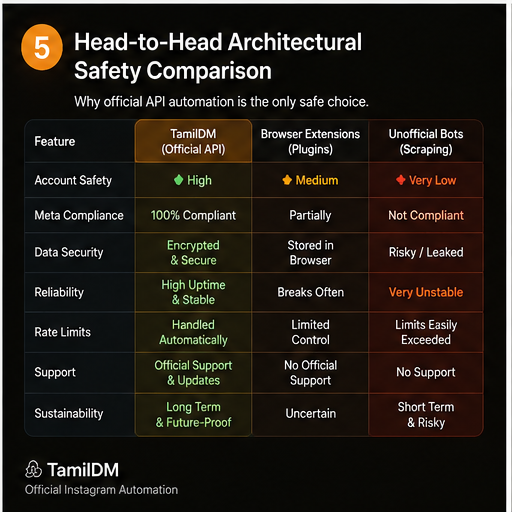
Official automation tools like TamilDM use Meta's official Instagram Graph API. This changes the technical relationship completely:
- OAuth Authentication: You never share your password. You log in via Facebook Security OAuth, giving explicit, scoped permissions.
- Server-to-Server Webhooks: Instead of scraping your inbox, Meta pushes webhooks to our servers whenever a comment or message occurs. We send a clean API response back, which is completely expected and approved by Meta.
- Safety Governors: Official tools adhere to standard rate limits, ensuring your account never sends messages too fast.
By switching to an official Tech Provider, you are fully compliant with Meta policies. Your account is 100% safe from action blocks and deletion.
In the next guides, we will walk you through how to connect your account to the official Meta Business API and set up keyword triggers securely.
Frequently asked questions
501What exactly triggers an Instagram action block?
02How long does an Instagram action block last?
03Will changing my password remove a restriction?
04Can I appeal an Instagram restriction?
05Is it safe to automate again after a restriction lifts?
Ready to Safe-Automate Your Instagram?
Connect TamilDM using Meta's official API to handle auto replies, stories, and DM flows securely. Start free in under 5 minutes.
Recommended Guides & Tutorials
 Safety
Instagram Automation Rules: What Meta Actually Allows in 2026
The line between allowed automation and a restricted account, explained from Meta's own permission model — reply windows, initiation limits, messaging quality scores, and what triggers enforcement.

TamilDM Team
Product & Growth
SafetyOfficial vs Unofficial Instagram Automation: The Safety Comparison
Compare official Meta Business API solutions with unofficial browser extensions and headless scrapers to protect your account health.
TamilDM Team
Product & Growth
 Guides
How to Block Spam Comments & Auto-Reply on Instagram & YouTube with AI Shield
Protect your brand reputation and automate YouTube and Instagram comment replies with TamilDM's AI Comment Shield and auto-moderation engine.
Sri Guru
Founder